A Difficult Challenge

This is about the most difficult challenge I faced when our university switched to online teaching due to the COVID-19 crisis. I had not much trouble with the technical aspects and logistics. I may not be a digital native, but I know that the ability to create, evaluate, and effectively utilize information, media, and technology are required 21st-century skills that teachers are expected to possess. So, I tried my best to acquire them.
What’s the difficult challenge then?
Online teaching is still teaching. As I reiterated in a previous essay, teachers should achieve the course objectives, cover the topics in the syllabus, discuss the lessons, assign work, and assess learning. They should also find a way to motivate students and elicit participation, even when teaching online. Of all the things teachers need to do when teaching online, I found assessment the most difficult. Determining whether students have learned and measuring the extent of their learning is very challenging.
Here is how I navigated that difficult challenge…
The university where I am teaching now has provided us with two platforms for online teaching – Cisco Webex and E~Class.
We meet our students online through Cisco Webex. In addition, E~Class, part of the university’s portal, allows professors to upload course materials in any electronic format, assign and administer tests, and communicate with students. It has functions for submitting students’ assignments and other graded course requirements, along with their corresponding marks/grades.
During the first week of (online) classes, I tried to check an assignment submitted by one of my students through E~Class. Going through the many steps to open, mark/check, and grade the assignment took time. With me handling more than 140 students and each of them having an assignment or two in a particular week, checking/marking would be time-consuming. I figured it would be better and easier if the students write whatever course requirements I assign in MS Word, because the application has an “Insert-Comment” function that allows me to directly mark/check the students’ paperwork without clicking too many buttons.
So, I asked my students to use MS Word for their assignments instead of submitting them directly in the E~Class assignment section.
After that, I directed the students to send their assignments to me via email, not through E~Class anymore.
Then I realized that such was not a wise move, because I needed a better way to organize and check the assignments.
During the first week, my Gmail account was flooded with emails from students, and I found it too difficult to organize their assignments and sort them per class. A few of my students even used HWP and PDF. I had to tell them to use MS Word only because I could no longer find the time to find out whether HWP and PDF have the “Insert-Comment” function that MS Word has. I got worried that I probably made the process of marking/checking course requirements and returning them to students more difficult than just doing everything through E~Class.
I summoned the gods and goddesses of creativity and resourcefulness to help me find that better way.
They responded, and I found my solution.
I recalled that a friend had sent me some documents through Google Drive before. That was the first time I used Google Drive. I called that friend and asked if I could share a Google Drive folder or subfolder with another person, so only the two of us could access it. The answer was yes. My problem was solved.
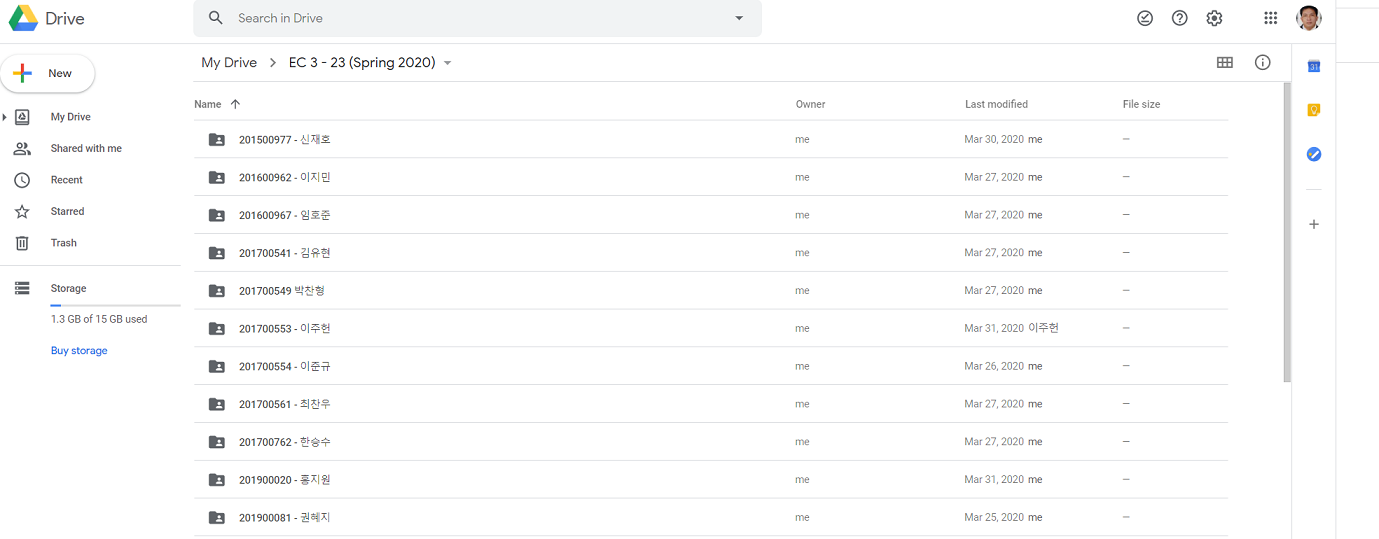
I created a Google Drive folder for each class assigned to me this (spring) semester. After that, I created individual subfolders for each class member. It was tedious, but it was the best way I could organize my students’ assignments and other requirements. This made the process more manageable.ccount was flooded with emails from students, and I found it too difficult to organize their assignments and sort them per class. A few of my students even used HWP and PDF. I had to tell them to use MS Word only for I could no longer find time to find out if HWP and PDF have that “Insert-Comment” function that MS Word has. I got worried that I probably made the process of marking/checking course requirements and returning them to students more difficult than just doing everything through E~Class.
I summoned the gods and goddesses of creativity and resourcefulness.
They responded.
I recalled that a friend sent me some documents before through Google Drive. That was the first time I used Google Drive. I called that friend and asked if it is possible to share with a person a Google Drive folder/subfolder and both of us (only) could access that folder/subfolder. The answer was yes. My problem was solved.
I created a Google Drive folder for each class assigned to me this (spring) semester. After that, I created individual subfolders for each class member. It was tedious, but it is the best way I could organize the assignments (and other requirements) of my students.
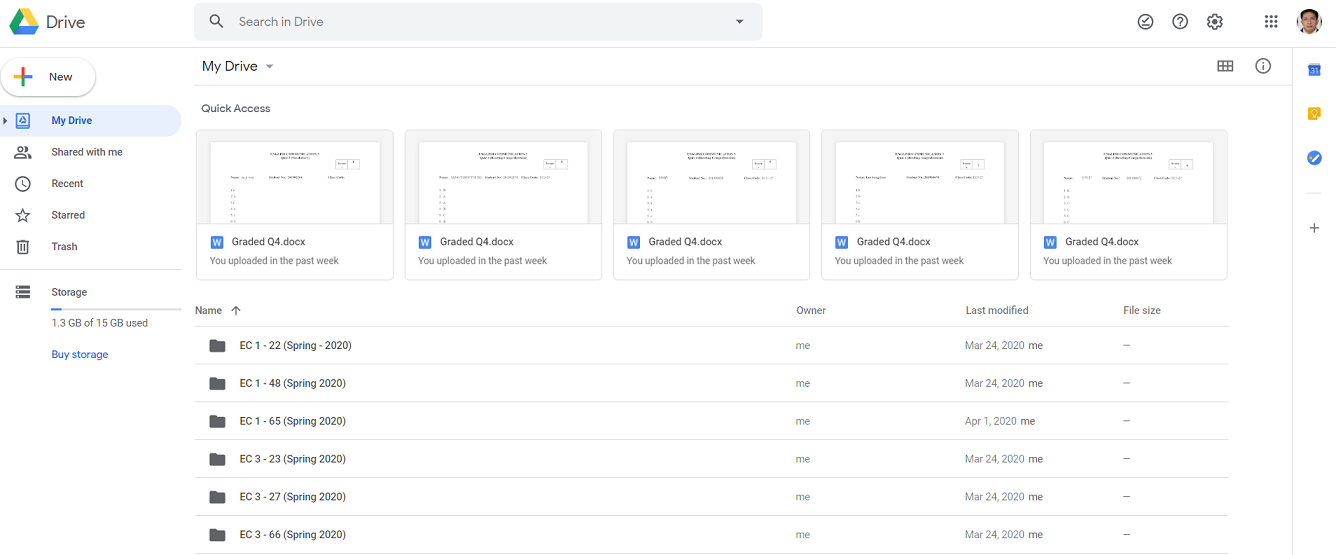
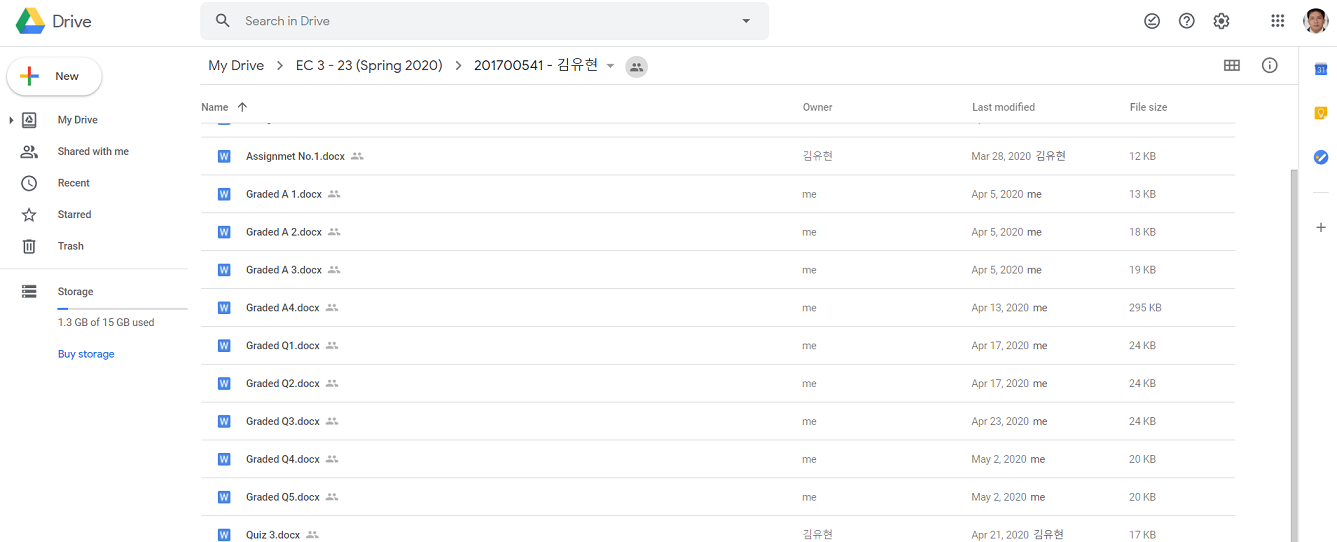
In the process, I had to require them to create Gmail accounts so creating (and accessing) the Google Drive folder would be easier. As a result, starting in the second week of the semester, they stopped sending their assignments to my email. The flood of e-mails in my Gmail account subsided. All they need to do is open their Google Drive folder and drag and drop whatever I require them to submit to the subfolder we are sharing.
If they want to see their scores and any feedback I had for them on their assignments, all they need to do is open the subfolder (we are sharing) in their Google Drive. I realized then that I just created something similar to a digital student portfolio.
In the past, I required students to maintain a portfolio. I asked them to submit a folder to me (South Korean students call it a “file”) containing their name, student number, and class code. In those folders, they keep the results of their quizzes, exercises, tests, and other graded activities. I keep those folders in my office and bring them to class when we meet so they can check their scores and see how they are performing. It enables them to track their own progress. They can determine weekly how many 100-grade points they need for the course they already have. That’s possible because at the beginning of the semester, I give my students a grade checklist/guide and transmutation tables, and I teach them how to compute their own grades manually. So, I make sure to mark/check their quizzes, exercises, and whatever else I require them to submit before our next meeting. If I also need to communicate something (related to our course) to specific students, I would insert notes in their individual folders.ng.
With the Google Drive folder/subfolder, my portfolio system just turned digital.
Next, I tried to figure out how to administer those quizzes and tests online. The challenge was ensuring the validity and reliability of the results of such quizzes and tests, given that it would be very easy for the students to open their notes while taking them, since I am not beside them to watch what they are doing.
It’s easy (and difficult at the same time) – create test items that require comprehension and analysis. Avoid creating questions or test items they could easily answer by simply glancing at their review guides. The items I created should engage their higher-order thinking skills. The quizzes and tests should prompt students to apply what they have learned rather than simply write down on their answer sheets what they have memorized.
I initially thought of administering the quizzes and tests through SurveyMonkey, the online survey tool I use for my research. The tool (SurveyMonkey) would do the checking, and all I need to do is generate a summary report of the scores – the same thing I did when I wanted to get summary results from the surveys I conducted in the past. But during the 2nd week of classes, I had an epiphany that I could actually administer quizzes and tests through Cisco Webex, but I had to require students to immediately drag and drop their answer sheets into their Google Drive folder/subfolder to maintain the integrity of the testing. It’s a process simpler and more practical than I thought it would be to do through SurveyMonkey.
I tried it. I gave my first quiz through Cisco Webex. Through the “shared screen” of the application’s environment, I opened the PowerPoint file that contains the items for my first quiz. I jokingly told myself then that it was something historical – it was my first quiz in the COVID-19 era. I gave them 10 minutes to finish the 10-item vocabulary quiz. That’s the same amount of time we give our students for their quizzes during face-to-face classes. That’s a very long time for my “advanced” students but just enough for the “not-so-advanced” among them. To allow time to drag and drop the answer sheets into their Google Drive folder, I gave them an additional 3 minutes, although I know the process can be done in a minute or less. It was a trial of sorts, so I was a little bit generous with the time allotment. And yes, it was a success.
What if they attempt to change their answers anytime after the quiz? They can do that easily because they have access to their own folders. But my students know that if they change anything on the answer sheets they drag/drop to the folders we are sharing, the Google Drive folder has features that would allow me to see the exact date and time changes were made. No changes are allowed after the allotted time for dragging and dropping. I told them that changing anything in their quizzes and tests after the designated submission time will be considered cheating. And they know the consequences for cheating.
To prevent my students from sharing information about the quizzes and tests I give them with their friends in my other classes, I prepare separate sets for each class. In addition, I am not using quiz/test items from the item bank my department created for expat ESL teachers like me. I created my own quizzes and tests.
Now, all of my students have their own Google Drive folders where all of their assignments, short and long tests, and their projects are put together. There they can check their scores and read my feedback anytime they want.
Which is easier to check/mark, the digital copies or the hard copies of students’ assignments, exercises, quizzes, and tests? The answer is – the hard copies. The digital copies take longer to check/mark. I go the extra mile doing it. This is the other reason I consider assessment as the most challenging part of online teaching.

Posted on May 7, 2020, in Online Teaching, Teaching During the Pandemic and tagged Online Teaching, Teaching During the Pandemic. Bookmark the permalink. 2 Comments.



Pingback: To Pass, Or Not To Pass | M. A. D. L I G A Y A
Pingback: TO PASS, OR NOT TO PASS | M. A. D. L I G A Y A