Blog Archives
BACK TO “OFFLINE CLASSES”

Finally holding classes face-to-face after more than two years was like a breath of fresh air. It was the break that people in our university – students, teaching and non-teaching personnel, and school administrators – so badly needed after months of being segregated because of Covid-19.
But with the pandemic slowly waning, the campus has gradually gone back to life. The members of the academic community could be seen again walking to and fro inside buildings and pathways. The queues are back in the university’s bakehouse, cafeteria, and coffee shops. The gym is filled with people, young and old, working out. The basketball and tennis courts are once again noisy.
But there’s no better sign of life and reclaimed semblance of normalcy on the campus than in the classrooms where classes are being held. I had mixed emotions after reading the notice that the university is abandoning online classes and teachers are expected to meet the students for face-to-face classes.
I have no problem with either online or offline education because no matter how teachers deliver learning, virtually or inside the classroom, they perform the same pedagogical functions – they prepare a lesson plan, set objectives, motivate students, discuss the lessons, give assignments and seatwork, and evaluate learning. So, with the marching orders given – conduct classes face-to-face – I got ready for it.
The truth is I heaved a sigh of relief when the university decided to go back to offline classes. Why? After 5 semesters of online teaching, I discovered that virtual classes are more difficult to handle. I figured out why – I did my online classes synchronously. Things could have been easier for me had I chosen the asynchronous method where all I needed to do is prepare a video presentation and ask the students to watch it. No offense meant to anybody, but I don’t consider that teaching. I don’t feel like performing my pedagogical functions when all I do is prepare videos of my lessons. I feel like shortchanging my students. With the synchronous method, classes are run in real time and the students are attending together from different locations. This version of online teaching gives the students a chance to participate in the discussions and to ask questions if they want and need to. Teachers could guide them when performing graded activities. There is actual real-time interaction between the students and their teachers, something that cannot be done when teachers teach by just uploading videos. Not actually interacting with the students, even only through online platforms is not giving them enough guidance in the learning process. It is risky to rely on the assumption that students are responsible enough to watch the videos and perform the required activities by themselves.
As I said earlier, I had mixed emotions when our university made it mandatory for English teachers to conduct classes offline. I was excited and at the same time wondering how would it be to conduct face-to-face classes once again. Admittedly, I was a little bit tentative for I have already gotten used to doing online teaching. But as soon as I stood in front of my students and started talking, everything went seemingly autopilot. I was in familiar territory. The teacher in me went to work without missing a beat. Before I knew it, my first class for the Fall Semester of 2022 was completed.
So, it’s face-to-face classes again. Both I and my students are back in the “real classroom.” I expected the usual things. There might be some classroom management issues – students using their cellphones and other gadgets, one or two of them sleeping while I am teaching, or what-have-you. These things I address during the first day of class. I would tell them that I am dealing with young adults, not kids, who know what they should and shouldn’t do. Most of the time, it works. I never stopped teaching just to call the attention of the students using their cell phones or to arouse the students who fell asleep. Rarely those happened anyway.
There are times a student might come late and I need to decide whether to just excuse them or strictly implement the attendance policies of the university. If it’s only one absence, I strike it off the record especially if the student’s explanation as to why they came late I deem acceptable. I am almost certain also that a number of them would ask me to change their grades for one reason or another… something that unfortunately I would never do. I give my students the grades they deserve. I check and double-check their scores before I encode them into the university’s portal.
It really felt great seeing the students again in the classroom. But while we may have reverted back to face-to-face mode of delivering education, I wouldn’t say that I went back to the traditional way of delivering my pedagogical functions. If there is one great thing the pandemic taught me it is optimizing the use of computer and information technology in everything that I do as a teacher. Even before the pandemic, I relied heavily on computer-aided instruction. I used PPT for my lectures and instead of using chalk or board marker when needing to write something in addition to what I have on my presentation, I would use a blank slide.
I have gone completely paperless for the assessment and evaluation of my students’ performance. I am using the Google form for all my tests, quizzes, assignments, and graded exercises. It is through the university’s portal that I send my students link to those Google forms. They take them using their cell phones, tablets, or laptops. The Google form has features that could be used to prevent and discourage students from sharing answers.
Even the submission of course requirements (projects, homework, etc.) should be done virtually as well. I created an electronic portfolio for each student using the Google Drive folder where they can drag and drop (upload) whatever they need to submit. I also created a common class folder (through Google Drive) where I upload lectures, reviewers, and other documents and files related to the course).
Except for the “paperless” assessment and evaluation of students’ performance, all of the foregoing are things I have been doing before the pandemic. I just figured that as a 21st century teacher teaching 21st century skills, knowledge, and values to 21st century students, it is my obligation to embrace computer and information technology so I could be more efficient in the performance of my duties and obligations as a teacher.
Online Teaching Is Still Teaching

As most schools continue to hold classes online because of the coronavirus pandemic, there’s one question that needs to be answered – “Which is the MORE APPROPRIATE AND BETTER way to teach online – upload a class video for the students to watch or meet the students online via WEBEX, ZOOM, GOOGLE MEET, or any other virtual learning platforms?
Instead of answering the question directly, let me just share my views about online learning.
Teachers like me should understand this – online teaching is still teaching. It’s not a magic trick that we are using to keep the students entertained or preoccupied while we are waiting for the COVID-19 crisis to dissipate. It should not be treated as a band-aid solution to the problem of not being able to meet the students face-to-face.
Online or otherwise, when you are a teacher, you should teach. You ought to find a way to achieve the objectives of the course/s you are teaching, cover the topics enumerated in the syllabus, motivate your students, discuss the lessons, give assignments, and evaluate learning. This is the time to use your creativity and resourcefulness.
Be reminded of the three major activities teachers do – planning, instruction, and assessment. Pedagogy – the art, science, or profession of teaching – remains the same, with or without COVID-19. The virus is not an excuse for you not to perform to the fullest your duties and responsibilities as a teacher.
The most important part of the planning process is the setting of learning objectives. Whatever you do as a teacher, online or otherwise, should be grounded on the objectives of the course. There are course objectives and there are unit objectives (or goals). You should know this if you are really trained to be a teacher (and was not just plucked from certain geographical locations of the world to pose as a teacher). Supposedly, you should also know that for every topic you present to the students you also have objectives (or goals), right?
It is only when you are well-grounded on the objectives (course-unit-topic) that you should begin teaching – online or otherwise. You’d better not teach if not because you will become the embodiment of “the blind leading the blind.”
So, online or otherwise, you should be guided by the objectives of the course and of the specific units listed in the syllabus. There are times that even the objectives (goals) for each topic under specific units are provided by the school where you are teaching. If not, then it is your duty as a teacher to create them. Don’t whine, it’s part of your job. You signed up for it. And come on, creating learning objectives (goals) is not rocket science.
After setting the learning objectives (and planning other teaching-learning activities), what should you do? I know that you know (hopefully) what comes next after the planning – instruction. Simply put – after the setting of objectives – you TEACH.
In case you have forgotten let me remind you of the definition of instruction – “the purposeful direction of the learning process.” The main aim of instruction, online or otherwise, is learning. Don’t forget that. So, whether your meet your students “face-to-face” or through any of the different platforms online, you have to teach them purposefully. We have different views. Rest assured that I respect yours. But for me, just uploading videos is not teaching, no matter how sophisticated are the videos you create. Videos cannot carry out the multi-faceted role of the teacher. Videos, at best, are just supplementary learning materials.
Don’t tell me that students prefer just watching videos over attending actual online classes. Of course, they would prefer that because it’s convenient for them. But teaching is not a matter of choosing which strategies the students consider comfortable for them. Teaching is choosing which methods are best for them. It’s choosing which ones could maximize learning, which ones would lead to the attainment of the objectives of the course.
Now, let me continue.
After setting the objectives, you teach. After that, what comes next?
Answer – assessment. Call it testing to make it simple.
After teaching, online or otherwise, you need to determine whether or not your students learned through quizzes, exercises, assignments, tests, and other methods of assessment. But don’t forget that like instruction, assessment should also be purposeful. You don’t dump in the laps of your students all those academic works for the purpose of making them busy and simply to comply with course requirements. Education doesn’t work that way. You will use their scores in whatever you require them to do or submit to measure the extent of their learning, to evaluate how efficient are your teaching methods and strategies, and to determine if the course/unit/topic objectives are met.
There are two more important reminders for those who are teaching online. Firstly, don’t forget that you are not supposed to give your students assignments and tests on topics you did not discuss and thoroughly explained. And secondly, make sure to mark/grade each of your students’ tests and assignments. All marked/graded course requirements should be returned to the students. They need to be given feedback on their performance.
So, online or otherwise, when you are a teacher, be a teacher. Set your objectives, teach, and assess. Even if you’re holding the class online, you still need to motivate your students and elicit their participation. Do all those things purposefully.
Now, what do you think is my answer to the question I asked at the beginning of this article?
Wishing Classes Would Still Be Online
For the next semester, I would still prefer that classes are held online instead of face-to-face. Why?
Not because online classes result in better learning. There is no conclusive evidence as to which of the two is more efficient when it comes to delivering education. Research findings of comparative studies made between online and face-to-face classes are inconclusive with some saying one benefits students better than the other while others claim that there’s no significant difference at all on their effects on learning.
Not also because online classes are more convenient for teachers. On the contrary, I consider teaching online more challenging than the traditional method. I am a teacher and whether online or otherwise it is my obligation to perform the following: set objectives and ensure that they are achieved; cover each topic enumerated in the syllabus; motivate students and elicit their participation; give assignments, check them, and show the students the results; and assess and measure learning.
Doing anything less than the foregoing, either in the traditional classroom or in the virtual set-up, is short-changing the students. It’s a disservice to the teaching profession. But doing them all online is easier said than done. Performing those pedagogical functions online tested to the hilt my creativity and resourcefulness. I had to dig deeper into my bag of tricks. My patience was truly tested.
The truth is I really want to go back to the classroom to teach. But why do I wish we could have our classes still online next semester?
Simple – the coronavirus is still like Damocles sword hanging over our heads. You’ll never know when it would drop and deliver a deadly infection. In short, it’s still risky to hold face-to-face classes especially with the current Covid-19 variants proving to be more transmissible and with full vaccination still yet to be achieved.
So, should classes be held online again next semester, I don’t mind having my creativity and resourcefulness getting tested further if that would mean ensuring that all stakeholders in the academe, especially the students, are safe and sound.
In preparation for the possibility of virtual learning again for the autumn semester, I have replenished my bag with new tricks over the summer and I think my patience would no longer be tested. In the past three semesters, I have gained the needed experience and insights about online teaching and learning that I think there’s nothing more that would surprise me.
By now, I am aware of the behavior of students when attending classes virtually. I know how to deal with them. I know what to expect from the students and what not to.
Additionally, through self-study and the generosity of a techie friend, I came to learn what I needed to learn, technology-wise, to make my first venture into online teaching easier. I don’t mean that I embraced the use of technology for teaching for the first time during the pandemic. Ever since I have been trying to learn as best as I could how to apply information and communication technologies in my classes. But when the university (where I am currently teaching now) switched to virtual learning, they provided platforms (Cisco Webex and the university’s E-class) for online teaching which I was unfamiliar with then. That I had to learn. And I did.
During the spring semester last year (2020), the time online classes in our university started, the biggest challenge I faced was the marking/grading of assignments, projects, quizzes, and tests and ensure the reliability and validity of the results. I overcame that dilemma by learning to use the Google form together with an app that allows the setting of time limits. The setting of time limits is necessary in order to avoid cheating in any form. And to avoid the possibility of cheating, I targeted higher-order thinking skills (evaluating, analyzing, and creating) in my tests and other graded activities. It may not be 100% foolproof, thus, at the beginning of the semester, I always explain to my students the importance of intellectual honesty.
I also used the Google drive folder to create an electronic portfolio for each of my students. In their individual Google drive folders is where they upload their assignments and course requirements. That is also where I give them feedback and show them the results of tests and other graded activities.
I think I am now more equipped to do online teaching. So, if ever our university decides to not conduct face-to-face classes yet, I am ready.
The Challenges of Online Teaching – 2
(The Challenges of Online Teaching – 1)

My second semester of online teaching is about to end. With the 3rd wave of coronavirus onslaught happening here in South Korea, our university might decide to still not hold face-to-face classes for at least during the spring term of the next school year. Yes, there’s a light at the end of the dark Covid-19 tunnel – immunization is on its way. Pharmaceutical companies have announced the successful development of a vaccine. However, the distribution of the said vaccine to different parts of the world may still take months.
Online classes are more challenging than conducting actual classes in the classroom. This was my (indirect) response when asked whether I prefer remote learning over teaching in person. The difficulties are not too much on pedagogy for remote or face-to-face, teaching is teaching. The things you do as a teacher are pretty much the same and they boil down into the following – planning, instruction, and assessment. As I pointed out in another essay, “Online or otherwise, when you are a teacher, you should teach. You ought to find a way to achieve the objectives of the course/s you are teaching, cover the topics enumerated in the syllabus, motivate your students, discuss the lessons, give assignments, and evaluate learning.”
Why then that I consider online teaching more challenging than actual teaching in the classroom? After almost two semesters of doing online classes, there’s much I can share about it.
First and foremost, it forced me to account for how much I have invested in learning technology, especially those that relate to teaching. Well, I may have not taken any computer and information technology-related courses but I have taken advantage of the free access I have to the libraries and computer laboratories of the schools where I taught and learned what I needed to learn. Google and YouTube taught me a lot as well. In short, using the application and technology required to carry out online classes for me is not, generally speaking, a rocket science. There were some things I learned on the fly and there were other things that I learned by not hesitating to ask the help of a friend and colleague when I had to.
As I pointed out in another article, “With or without COVID-19, the ability to use technology in the classroom – to apply all available technology resources to education – is something that teachers should have trained themselves to do a long time ago. The use of technology has become an integral part of being a 21st-century teacher. There’s no way out of it. Schools should have made it a basic requirement for the teachers they hired. The abilities to create, evaluate, and effectively utilize information, media, and technology are required 21st-century skills. Teachers are expected to possess them.”
Secondly, online teaching would challenge teachers’ creativity and resourcefulness to the hilt. The one thing I missed so much about holding classes in the classroom is using the blackboard/whiteboard. I write a lot of examples when I explain grammar points and discuss vocabulary. Using the “annotate function” of the Webex screen while doing a PowerPoint presentation would allow only a few examples to be written. I resolved this by not clicking the slide show of the PowerPoint and split the screen into two where on one side is the PowerPoint slide that contains the information I am discussing and on the other a blank Microsoft Word document where I write the examples I want to write while discussing.
The students also need participation points which they could get by answering the questions I asked while I was doing my presentation. Calling on just one student (or a few) to answer a particular question would not give other students an equal opportunity to answer thus depriving them of a fair chance to earn participation points. This I resolved by asking the students to answer my questions using the “chat text box” of Webex. I would pause for a few seconds after asking my questions to give everybody an equal opportunity to answer and after the class, I check their answers and record their points.
I also created an electronic portfolio for each of my students and had to improvise with my assessment methods. I explained the aforementioned in detail here.
Lastly, with online teaching, I have to stretch my patience.
I require my students to turn their video cameras on during my online classes. Failure to heed would mean expulsion from the class. This I did when I got an assurance from our supervisor that doing so does not constitute any violation of university guidelines or existing laws of the country. I am not violating students’ privacy when I require them to turn their video cams on.
What’s the use of attending online classes if the students’ video cams are off? You will not somehow be able to monitor if they are really there and what are they doing. Yes, I can randomly call their names to check but should they respond how sure I am that it was really them responding and not someone else. And do I have to stop instruction once in a while just to randomly call names?
But there were also a variety of problems I encountered when their video cams are on. Some would have the ceiling or wall of their rooms shown instead of their faces. Some I would see obviously talking to someone else in their room or doing something else instead of paying attention to what I was discussing. They know my policy as their teacher. They know that if they do things that I deem inappropriate, they will be “moved to the lobby.” I would accept them back should they request so.
What I consider the weirdest when doing classes online is that sometimes I feel like instead of teaching I was delivering a monologue. Thus, I make sure that I ask questions not only to elicit their participation but also to re-establish my connection to my students in case that after I talked for (probably) too long, their mind veered away.
It is really difficult to know how many of the students are really listening during online classes. It is hard to know if some of them were actually watching a movie while I was teaching. I tried requiring them to turn their microphones as well while our online class was ongoing to discourage them from playing music or watching movies but the noise coming from different sources is just unbearable for all of us. Besides, they can simply use earphones if they don’t like me to hear the video of whatever they are playing while we’re having our online classes. So, I stopped requiring them to turn their microphones on.
I would tell my students once in a while that I am aware of the realities of online teaching and I have fully embraced them. I just have to do my part as their teacher and I would do no less. They are adults and they have a choice of whether they do their part as students or not.
At least in each of my classes, a few would be regularly answering my questions either by “raising a hand” or by using the “chat text box” to write their answers. The majority may be quiet most of the time but it does not mean they are not interested. Thinking that there are students like them expecting me to deliver is what keeps me going.
A Difficult Challenge

This is about the most difficult challenge I faced when our university switched to online teaching due to the COVID-19 crisis. I had not much trouble with the technical aspects and logistics. I may not be a digital native, but I know that the ability to create, evaluate, and effectively utilize information, media, and technology are required 21st-century skills that teachers are expected to possess. So, I tried my best to acquire them.
What’s the difficult challenge then?
Online teaching is still teaching. As I reiterated in a previous essay, teachers should achieve the course objectives, cover the topics in the syllabus, discuss the lessons, assign work, and assess learning. They should also find a way to motivate students and elicit participation, even when teaching online. Of all the things teachers need to do when teaching online, I found assessment the most difficult. Determining whether students have learned and measuring the extent of their learning is very challenging.
Here is how I navigated that difficult challenge…
The university where I am teaching now has provided us with two platforms for online teaching – Cisco Webex and E~Class.
We meet our students online through Cisco Webex. In addition, E~Class, part of the university’s portal, allows professors to upload course materials in any electronic format, assign and administer tests, and communicate with students. It has functions for submitting students’ assignments and other graded course requirements, along with their corresponding marks/grades.
During the first week of (online) classes, I tried to check an assignment submitted by one of my students through E~Class. Going through the many steps to open, mark/check, and grade the assignment took time. With me handling more than 140 students and each of them having an assignment or two in a particular week, checking/marking would be time-consuming. I figured it would be better and easier if the students write whatever course requirements I assign in MS Word, because the application has an “Insert-Comment” function that allows me to directly mark/check the students’ paperwork without clicking too many buttons.
So, I asked my students to use MS Word for their assignments instead of submitting them directly in the E~Class assignment section.
After that, I directed the students to send their assignments to me via email, not through E~Class anymore.
Then I realized that such was not a wise move, because I needed a better way to organize and check the assignments.
During the first week, my Gmail account was flooded with emails from students, and I found it too difficult to organize their assignments and sort them per class. A few of my students even used HWP and PDF. I had to tell them to use MS Word only because I could no longer find the time to find out whether HWP and PDF have the “Insert-Comment” function that MS Word has. I got worried that I probably made the process of marking/checking course requirements and returning them to students more difficult than just doing everything through E~Class.
I summoned the gods and goddesses of creativity and resourcefulness to help me find that better way.
They responded, and I found my solution.
I recalled that a friend had sent me some documents through Google Drive before. That was the first time I used Google Drive. I called that friend and asked if I could share a Google Drive folder or subfolder with another person, so only the two of us could access it. The answer was yes. My problem was solved.
I created a Google Drive folder for each class assigned to me this (spring) semester. After that, I created individual subfolders for each class member. It was tedious, but it was the best way I could organize my students’ assignments and other requirements. This made the process more manageable.ccount was flooded with emails from students, and I found it too difficult to organize their assignments and sort them per class. A few of my students even used HWP and PDF. I had to tell them to use MS Word only for I could no longer find time to find out if HWP and PDF have that “Insert-Comment” function that MS Word has. I got worried that I probably made the process of marking/checking course requirements and returning them to students more difficult than just doing everything through E~Class.
I summoned the gods and goddesses of creativity and resourcefulness.
They responded.
I recalled that a friend sent me some documents before through Google Drive. That was the first time I used Google Drive. I called that friend and asked if it is possible to share with a person a Google Drive folder/subfolder and both of us (only) could access that folder/subfolder. The answer was yes. My problem was solved.
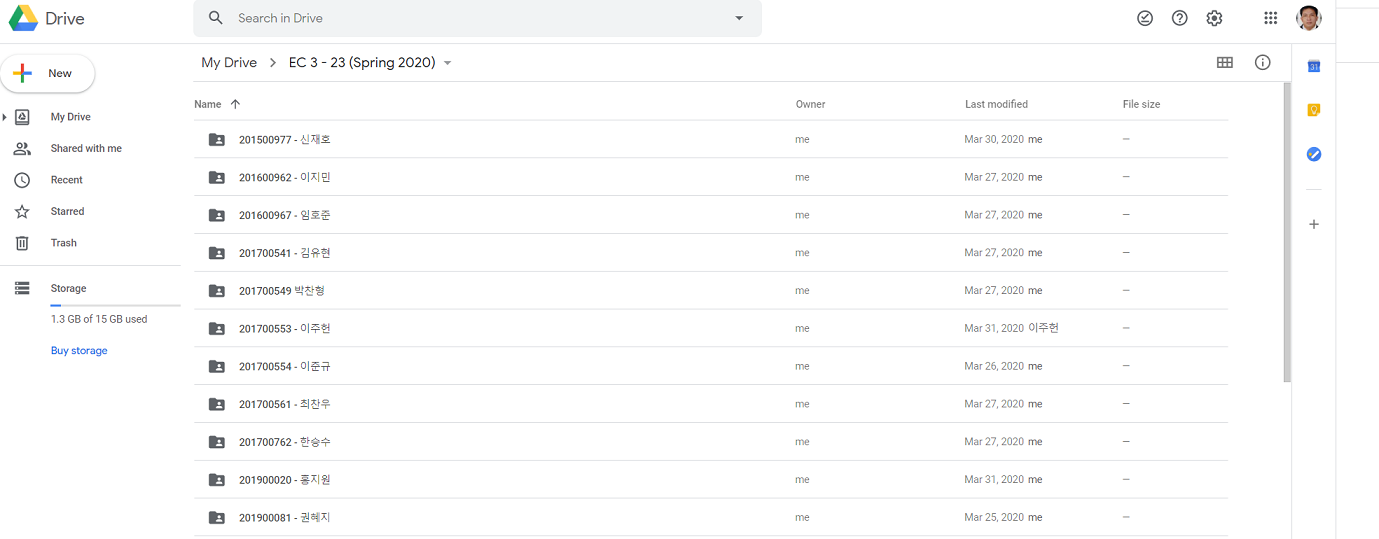
I created a Google Drive folder for each class assigned to me this (spring) semester. After that, I created individual subfolders for each class member. It was tedious, but it is the best way I could organize the assignments (and other requirements) of my students.
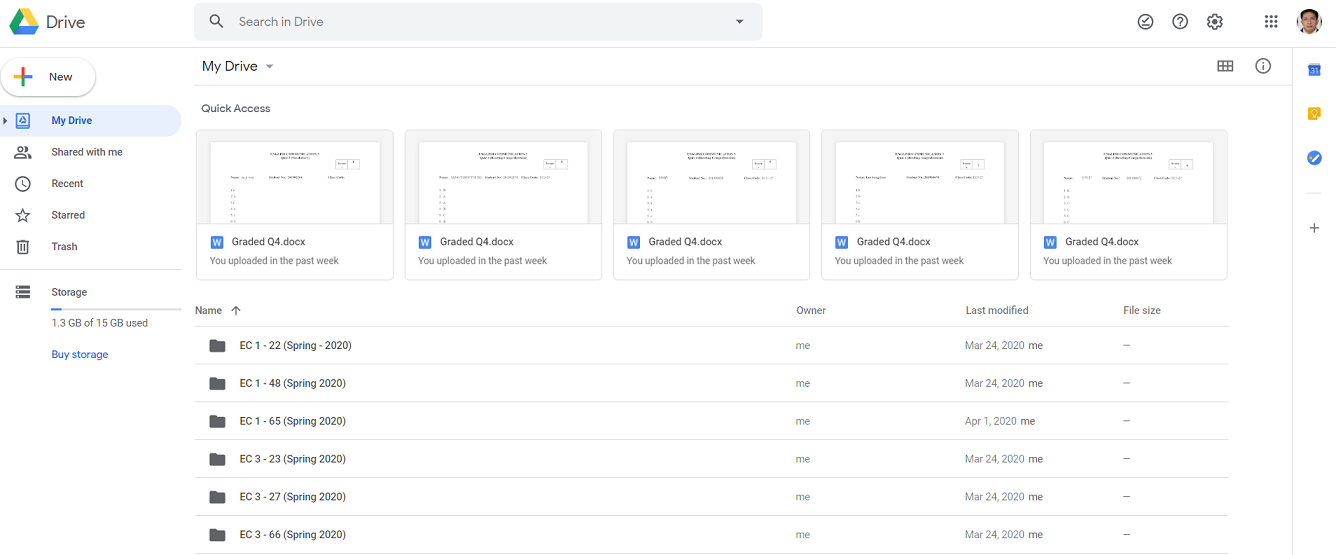
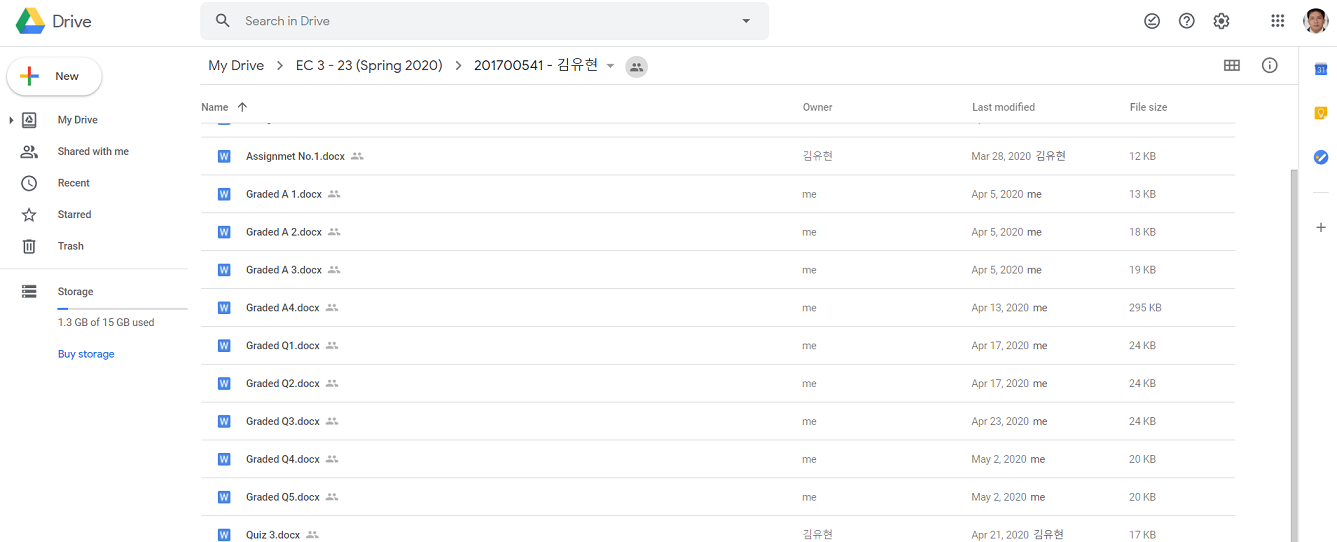
In the process, I had to require them to create Gmail accounts so creating (and accessing) the Google Drive folder would be easier. As a result, starting in the second week of the semester, they stopped sending their assignments to my email. The flood of e-mails in my Gmail account subsided. All they need to do is open their Google Drive folder and drag and drop whatever I require them to submit to the subfolder we are sharing.
If they want to see their scores and any feedback I had for them on their assignments, all they need to do is open the subfolder (we are sharing) in their Google Drive. I realized then that I just created something similar to a digital student portfolio.
In the past, I required students to maintain a portfolio. I asked them to submit a folder to me (South Korean students call it a “file”) containing their name, student number, and class code. In those folders, they keep the results of their quizzes, exercises, tests, and other graded activities. I keep those folders in my office and bring them to class when we meet so they can check their scores and see how they are performing. It enables them to track their own progress. They can determine weekly how many 100-grade points they need for the course they already have. That’s possible because at the beginning of the semester, I give my students a grade checklist/guide and transmutation tables, and I teach them how to compute their own grades manually. So, I make sure to mark/check their quizzes, exercises, and whatever else I require them to submit before our next meeting. If I also need to communicate something (related to our course) to specific students, I would insert notes in their individual folders.ng.
With the Google Drive folder/subfolder, my portfolio system just turned digital.
Next, I tried to figure out how to administer those quizzes and tests online. The challenge was ensuring the validity and reliability of the results of such quizzes and tests, given that it would be very easy for the students to open their notes while taking them, since I am not beside them to watch what they are doing.
It’s easy (and difficult at the same time) – create test items that require comprehension and analysis. Avoid creating questions or test items they could easily answer by simply glancing at their review guides. The items I created should engage their higher-order thinking skills. The quizzes and tests should prompt students to apply what they have learned rather than simply write down on their answer sheets what they have memorized.
I initially thought of administering the quizzes and tests through SurveyMonkey, the online survey tool I use for my research. The tool (SurveyMonkey) would do the checking, and all I need to do is generate a summary report of the scores – the same thing I did when I wanted to get summary results from the surveys I conducted in the past. But during the 2nd week of classes, I had an epiphany that I could actually administer quizzes and tests through Cisco Webex, but I had to require students to immediately drag and drop their answer sheets into their Google Drive folder/subfolder to maintain the integrity of the testing. It’s a process simpler and more practical than I thought it would be to do through SurveyMonkey.
I tried it. I gave my first quiz through Cisco Webex. Through the “shared screen” of the application’s environment, I opened the PowerPoint file that contains the items for my first quiz. I jokingly told myself then that it was something historical – it was my first quiz in the COVID-19 era. I gave them 10 minutes to finish the 10-item vocabulary quiz. That’s the same amount of time we give our students for their quizzes during face-to-face classes. That’s a very long time for my “advanced” students but just enough for the “not-so-advanced” among them. To allow time to drag and drop the answer sheets into their Google Drive folder, I gave them an additional 3 minutes, although I know the process can be done in a minute or less. It was a trial of sorts, so I was a little bit generous with the time allotment. And yes, it was a success.
What if they attempt to change their answers anytime after the quiz? They can do that easily because they have access to their own folders. But my students know that if they change anything on the answer sheets they drag/drop to the folders we are sharing, the Google Drive folder has features that would allow me to see the exact date and time changes were made. No changes are allowed after the allotted time for dragging and dropping. I told them that changing anything in their quizzes and tests after the designated submission time will be considered cheating. And they know the consequences for cheating.
To prevent my students from sharing information about the quizzes and tests I give them with their friends in my other classes, I prepare separate sets for each class. In addition, I am not using quiz/test items from the item bank my department created for expat ESL teachers like me. I created my own quizzes and tests.
Now, all of my students have their own Google Drive folders where all of their assignments, short and long tests, and their projects are put together. There they can check their scores and read my feedback anytime they want.
Which is easier to check/mark, the digital copies or the hard copies of students’ assignments, exercises, quizzes, and tests? The answer is – the hard copies. The digital copies take longer to check/mark. I go the extra mile doing it. This is the other reason I consider assessment as the most challenging part of online teaching.
ONLINE TEACHING IS STILL TEACHING
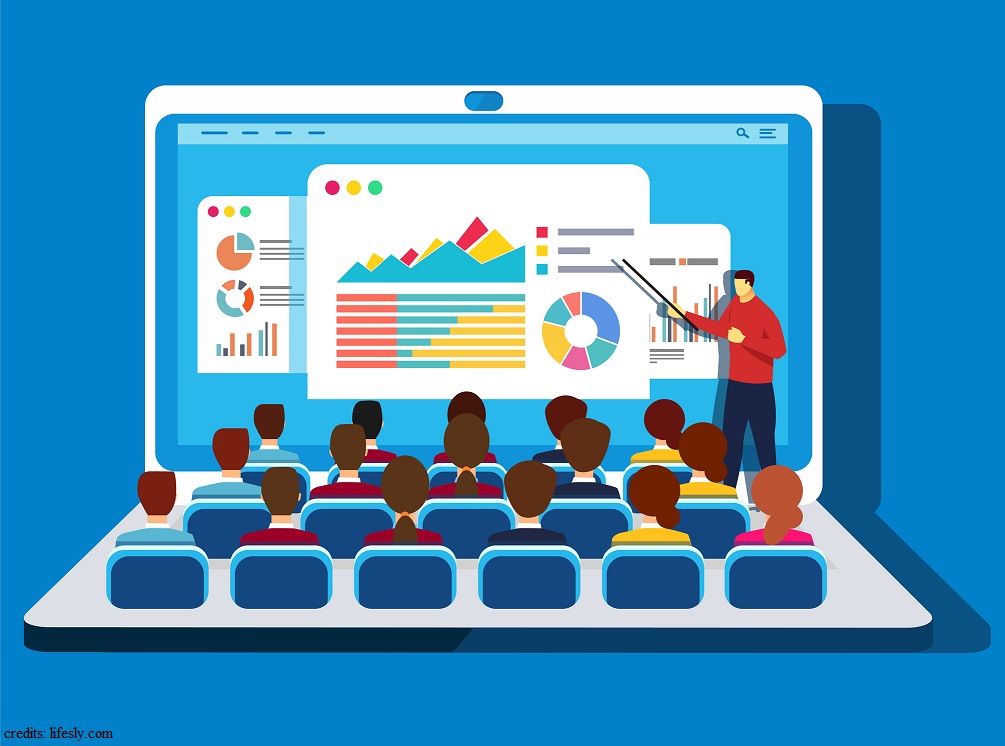 Teachers like me should understand this – online teaching is still teaching. It’s not a magic trick that we are using to keep the students entertained while we are waiting for the COVID-19 crisis to dissipate. It should not be treated as a band-aid solution to the problem of not being able to meet the students face-to-face in the campus.
Online or otherwise, when you are a teacher, you should teach. You ought to find a way to achieve the objectives of the course/s you are teaching, cover the topics enumerated in the syllabus, motivate your students, discuss the lessons, give assignments, and evaluate learning. This is the time to use your creativity and resourcefulness.
Be reminded of the three major activities teachers do – planning, instruction, and assessment. Pedagogy – the art, science, or profession of teaching – remains the same, with or without COVID-19. The virus is not an excuse for you not to perform to the fullest your duties and responsibilities as a teacher.
The most important part of the planning process is the setting of learning objectives. Whatever you do as a teacher, online or otherwise, should be grounded on the objectives of the course. There are course objectives and there are unit objectives (or goals). You should know this if you are really trained to be a teacher (and was not just plucked from certain geographical locations of the world to pose or as a teacher). Supposedly, you should also know that for every topic you present to your students you also have objectives (or goals), right?
It is only when you are well-grounded on the objectives (course-unit-topic) that you should begin teaching – online or otherwise. You’d better not teach if not because you will become the embodiment of “the blind leading the blind.”
So, online or otherwise, you should be guided by the objectives of the course and of the specific units listed in the syllabus. There are times that even the objectives (goals) for each topic under specific units are provided by the school where you are teaching. If not, then it is your duty as a teacher to create them. Don’t whine, it’s part of your job. You signed up for it. And come on, creating learning objectives (goals) is not a rocket science.
After setting the learning objectives (and planned other teaching-learning activities), what should you do? I know that you know (hopefully) what comes next after the planning – instruction. Simply putting it – after the setting of objectives – you TEACH.
In case you have forgotten let me remind you of the definition of instruction – “the purposeful direction of the learning process.” The main aim of instruction, online or otherwise, is learning. Don’t forget that. So, whether your meet your students “face-to-face” or through any of the different platforms online, you have to teach them purposefully. We have different views. Rest assured that I respect yours. But for me, just uploading videos is not (online) teaching, no matter how sophisticated are the videos you create. Videos cannot carry out the multi-faceted role of the teacher. Videos, at best, are just supplementary learning materials.
After setting the objectives, you teach. After that, what comes next?
Answer – assessment. Call it testing to make it simple.
After teaching, online or otherwise, you need to determine whether or not your students learned through quizzes, exercise, assignments, tests, and other methods of assessment. But don’t forget that like instruction, assessment should also be purposeful. You don’t dump in the laps of your students all those academic works for the purpose of making them busy and simply to comply with course requirements. Education doesn’t work that way. You will use their scores in whatever you require them to do or submit to measure the extent of their learning, to evaluate how efficient are your teaching methods and strategies, and to determine if the course/unit/topic objectives are met.
There are two more important reminders for those who are teaching online. Firstly, don’t forget that you are not supposed to give your students assignments and tests on topics you did not discuss and thoroughly explained. And secondly, make sure to mark/grade each of your students’ tests and assignments. All marked/graded course requirements should be returned to the students. They need to be given feedback on their performance.
So, online or otherwise, when you are a teacher, be a teacher. Set your objectives, teach, and assess. Even if you’re holding the class online, you still need to motivate your students and elicit their participation. Do all those things purposefully.
**********
The biggest challenge I faced in online teaching is the marking/grading of assignments, projects, quizzes, and tests.



 M.A.D. L I G A Y A